Large Language Models (LLMs) Explained: From Math Intuition to Python (Hugging Face Transformers)
Prerequisites (and Sources)
- Basic Python knowledge (comfortable running notebooks and reading errors)
- You will use PyTorch and Hugging Face Transformers
- Recommended environment: Google Colab (no setup, runs in the browser, optional GPU)
- Primary reference (lecture):
- Li Hongyi (李宏毅), Introduction to Generative AI & Machine Learning 2025 (Lecture 1)
- Models & hosting:
- Hugging Face Hub
- If you use Meta Llama 3.2, follow the model card (license/access may be required):
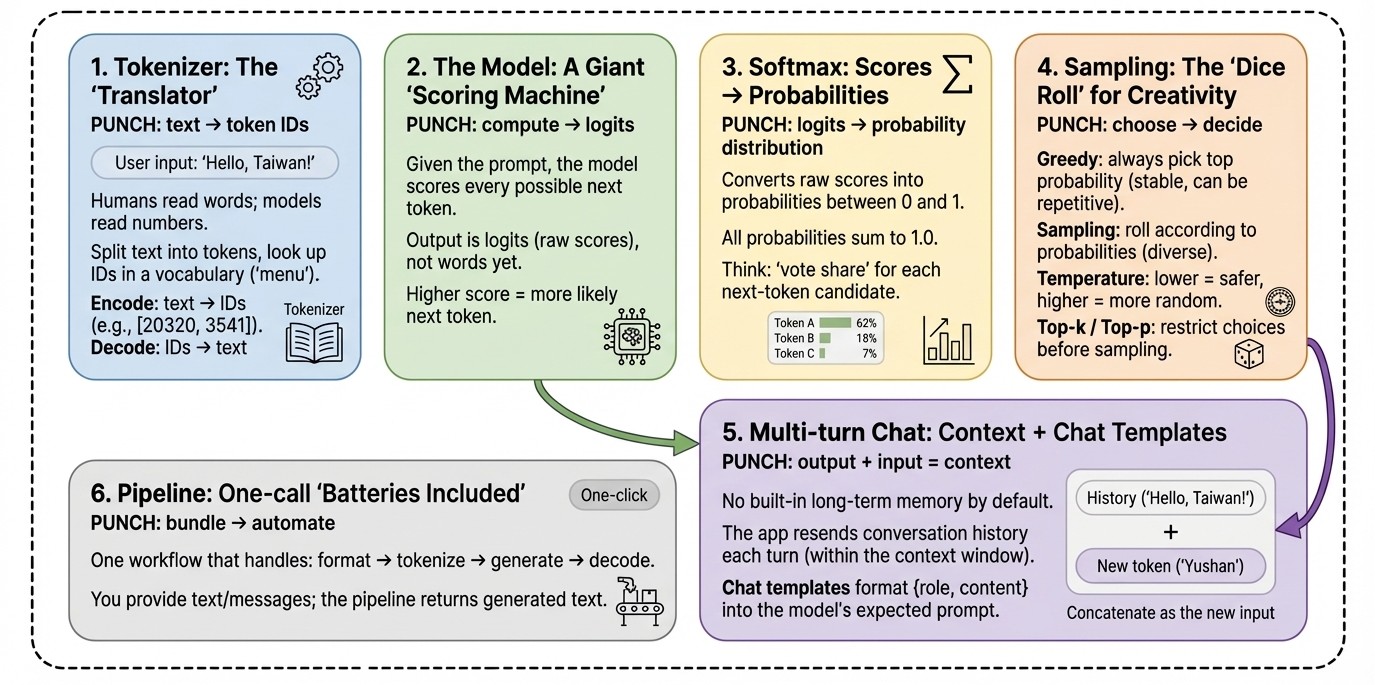
1. Tokenizer: The “Translator” (Encoding & Decoding)
Core idea
Think of a tokenizer as a machine that turns text into LEGO brick IDs.
- Humans read words/characters
- LLMs consume numbers (token IDs)
- A tokenizer does: split text → look up tokens → output a list of IDs
Analogy: Ordering at a strict restaurant
The menu has 100,000+ items. You can’t just shout a dish name to the kitchen.
You must point to the menu and order by the item number.
What to remember
- Encode: convert text → token IDs (e.g.,
[20320, ...]) - Decode: convert token IDs → readable text
Python example
from transformers import AutoTokenizer

# Model ID (tokenizers are model-specific: different models may tokenize the same text differently)
model_id = "meta-llama/Llama-3.2-3B-Instruct"

# Load the tokenizer (think: "the menu + the ID mapping table")
tokenizer = AutoTokenizer.from_pretrained(model_id)

text = "Hello, Taiwan!"

# Option A: encode / decode (most intuitive for learning)
# add_special_tokens=False: do NOT automatically add BOS/EOS or control tokens.
# This makes it easier to observe the raw tokenization result.
input_ids = tokenizer.encode(text, add_special_tokens=False)

print("Original text:", text)
print("Token IDs:", input_ids)

# Decode IDs back to text
# skip_special_tokens=True: hide special tokens if any appear
decoded_text = tokenizer.decode(input_ids, skip_special_tokens=True)
print("Decoded text:", decoded_text)

# Option B: common production-style usage (returns tensors + attention_mask)
# attention_mask tells the model which positions are real tokens (1) vs padding (0)
batch = tokenizer(text, return_tensors="pt", add_special_tokens=False)
print("Returned keys:", batch.keys())  # dict_keys(['input_ids', 'attention_mask'])
print("input_ids shape:", batch["input_ids"].shape)
print("attention_mask shape:", batch["attention_mask"].shape)
2. The Model: A Giant “Scoring Machine” (Logits)
Core idea
If the tokenizer converts text into IDs, the model’s job is to score every possible next token.
The model does not output the answer directly. It outputs a big list of scores called logits—one score per token in the vocabulary.
Analogy: A talent show Given the prompt “The tallest mountain in Taiwan is …”, the judges score every contestant (token). The highest score is the model’s current best guess for the next token.
Python example
import torch
from transformers import AutoModelForCausalLM

model_id = "meta-llama/Llama-3.2-3B-Instruct"

# Load the model (the "judges" that score next-token candidates)
model = AutoModelForCausalLM.from_pretrained(model_id)
model.eval()  # inference mode: disables training-only behaviors like dropout

prompt = "The tallest mountain in Taiwan is"

# Tokenize the prompt: returns input_ids and attention_mask as PyTorch tensors
inputs = tokenizer(prompt, return_tensors="pt")

# Disable gradient tracking: faster and uses less memory for inference
with torch.no_grad():
    outputs = model(**inputs)

# outputs.logits shape: [batch_size, seq_len, vocab_size]
logits = outputs.logits
print("logits shape:", logits.shape)

# We want the scores for the NEXT token, so take the last position (-1)
# next_token_logits shape: [vocab_size]
next_token_logits = logits[0, -1, :]
print("vocab_size:", next_token_logits.shape[0])

# argmax gives the highest-scoring token ID (the current #1 candidate)
top1_id = torch.argmax(next_token_logits).item()
print("Top token_id:", top1_id)
print("Top token (decoded):", tokenizer.decode([top1_id], skip_special_tokens=True))
3. Softmax: Turning Scores into Probabilities (Probability Distribution)
Core idea
Logits are raw scores, which are hard to interpret. Softmax converts logits into a probability distribution:
- each candidate token gets a probability in [0, 1]
- all probabilities sum to 1.0 (100%)
Reference: PyTorch Softmax
Analogy: Vote share Scores become “what percentage of votes each candidate gets.”
Python example
import torch

# Convert logits -> probabilities (a proper probability distribution)
probs = torch.softmax(next_token_logits, dim=-1)

# Show the top 5 most likely next tokens
top5_probs, top5_ids = torch.topk(probs, 5)

print("--- Top 5 next-token probabilities ---")
for p, idx in zip(top5_probs, top5_ids):
    token_str = tokenizer.decode([idx.item()], skip_special_tokens=True)
    print(f"token: {token_str!r} | p={p.item():.4f}")
4. Sampling: The “Dice Roll” for Creativity (Temperature / Top-k / Top-p)
Core idea
Once you have probabilities, the model does not have to always pick the #1 token.
Imagine a roulette wheel:
- slice size = probability
- you can either pick the biggest slice every time, or spin the wheel.
Common decoding strategies:
-
Greedy search: always pick the highest probability (stable, but can be repetitive)
-
Sampling: randomly draw according to probabilities (more diverse, sometimes less reliable)
-
Temperature: changes how “peaked” vs “flat” the distribution is
- lower temp (< 1): more conservative (high-prob tokens dominate)
- higher temp (> 1): more random (low-prob tokens get more chances)
-
Top-k / Top-p (nucleus): restrict the candidate pool before sampling to reduce nonsense outputs
Practical note: parameters like
temperature,top_k, andtop_ptypically matter only whendo_sample=True.
References:
Python example (manual temperature scaling + top-k sampling)
import torch

temperature = 0.7  # lower = safer/more deterministic, higher = more random/creative

# 1) Temperature scaling: logits / temperature, then softmax
scaled_logits = next_token_logits / temperature
scaled_probs = torch.softmax(scaled_logits, dim=-1)

# 2) Keep only the top-k candidates to avoid extremely unlikely tokens
top_k = 50
topk_probs, topk_ids = torch.topk(scaled_probs, top_k)

# 3) Re-normalize probabilities within the top-k set
topk_probs = topk_probs / topk_probs.sum()

# 4) Sample one token according to probability weights (the real "dice roll")
sampled_index = torch.multinomial(topk_probs, num_samples=1).item()
sampled_token_id = topk_ids[sampled_index].item()

print("Sampled token:", tokenizer.decode([sampled_token_id], skip_special_tokens=True))
Python example (practical: use generate)
generation_kwargs = dict(
    max_new_tokens=50,   # maximum number of NEW tokens to generate
    do_sample=True,      # enables sampling
    temperature=0.7,     # controls randomness
    top_k=50,            # sample from top 50 candidates
    # top_p=0.9,         # optional: nucleus sampling
)

output_ids = model.generate(**inputs, **generation_kwargs)
print(tokenizer.decode(output_ids[0], skip_special_tokens=True))
5. The Truth About Multi-turn Chat: Context + Chat Templates
Core idea
Chat models don’t have “long-term memory” across turns by default.
They appear to remember because:
- your app sends the conversation history back to the model (as tokens)
- the model reads it again inside its context window
Different chat models require different prompt formats (special tokens, role tags, etc.).
Transformers provides Chat Templates to format {role, content} message lists into what the model expects.
Reference: Chat Templates in Transformers
Analogy: A script copyist If you only ask “What about the second highest?” without context, the model has no idea “second highest of what.” You must include earlier lines of the script.
Python example (messages + chat template)
import torch

messages = [
    {"role": "user", "content": "What is the tallest mountain in Taiwan?"},
    {"role": "assistant", "content": "Yushan (Jade Mountain)."},
    {"role": "user", "content": "What is the second tallest?"},
]

# apply_chat_template formats messages into the model-specific prompt
# add_generation_prompt=True appends the "assistant turn" marker so the model continues as the assistant
formatted = tokenizer.apply_chat_template(
    messages,
    tokenize=True,              # return tokenized inputs (ready for the model)
    return_dict=True,           # return dict with input_ids / attention_mask
    add_generation_prompt=True
)

with torch.no_grad():
    out = model.generate(**formatted, max_new_tokens=50)

print(tokenizer.decode(out[0], skip_special_tokens=True))
6. Pipeline: A One-call “Batteries Included” Workflow
Core idea
pipeline("text-generation") is like a “meal kit”:
- you don’t manually handle tokenization, chat formatting, generation, and decoding every time
- you pass text (or chat messages), and the pipeline runs the full workflow
Reference: Transformers Pipelines
Python example
import torch
from transformers import pipeline

model_id = "meta-llama/Llama-3.2-3B-Instruct"

# Create a text-generation pipeline
# device_map="auto": uses GPU automatically when available (environment-dependent)
# torch_dtype: reduces memory; use float16/bfloat16 depending on your hardware support
pipe = pipeline(
    "text-generation",
    model=model_id,
    torch_dtype=torch.bfloat16,
    device_map="auto",
)

messages = [
    {"role": "system", "content": "You are a clear, fact-focused teaching assistant."},
    {"role": "user", "content": "What is the tallest mountain in Taiwan?"},
]

# Pipeline typically performs: chat template -> tokenize -> generate -> decode
outputs = pipe(messages, max_new_tokens=80)

# Depending on Transformers version, the output structure may differ slightly.
print(outputs[0]["generated_text"][-1])
Conclusion: Demystifying “AI Magic”
After breaking down the pipeline, the “mystery” becomes a set of verifiable steps:
- It doesn’t read like humans: it processes token IDs and vectors produced by a tokenizer.
- It doesn’t have a hidden intuition: it computes logits, then turns them into probabilities.
- Its “creativity” is tunable: temperature, top-k, and top-p directly shape randomness and style.
- Its “memory” is mostly context: multi-turn chat works by formatting and re-sending conversation history via chat templates.
Appendix: Beginner-friendly Tools
Google Colab
- Analogy: a cloud computer you borrow from Google
- Why it matters: run notebooks in the browser, optionally with a GPU
- Link: Google Colab
Hugging Face
-
Analogy: “GitHub for AI”
-
Why it matters: models, datasets, tokenizers, and tools in one place
-
Links: